
CrystalDiskMark


Download Now

CrystalDiskMark is a powerful and widely used disk benchmarking tool designed to measure the performance of hard drives, solid-state drives, and other storage devices. It provides detailed insights into your disk’s read and write speeds, allowing users to effectively evaluate and optimize their storage solutions. Whether you are a professional seeking to ensure peak performance or an everyday user wanting to monitor your device’s health, CrystalDiskMark offers an accessible and comprehensive solution.

What is CrystalDiskMark?

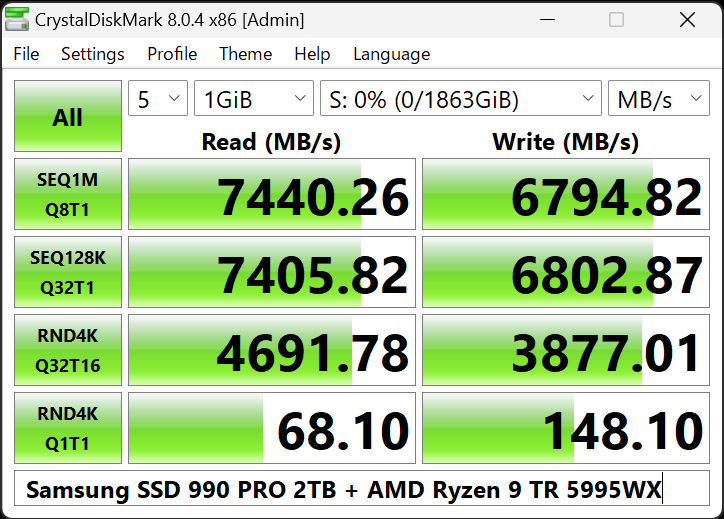
CrystalDiskMark is a free, open-source benchmarking tool designed to evaluate the performance of hard drives, solid-state drives (SSDs), and other storage devices. This software, developed by Crystal Dew World, allows users to measure sequential and random read/write speeds, providing a clear picture of a storage device’s capabilities. Compatible with Windows operating systems, CrystalDiskMark features an intuitive interface that allows beginners and advanced users to perform accurate disk speed tests. With its ability to customize test parameters, the tool is essential for professionals and enthusiasts looking to optimize their storage systems.


Installation and Setup

  1. System Requirements
    • Supported Operating Systems: Windows 7, 8, 10, 11
    • Minimum Hardware Requirements: 1 GHz processor, 1 GB RAM, 50 MB of free disk space
  1. Step-by-Step Installation Guide
    • Download: Visit the official CrystalDiskMark website and download the latest software version.
    • Run Installer: Open the downloaded file and run the installer.
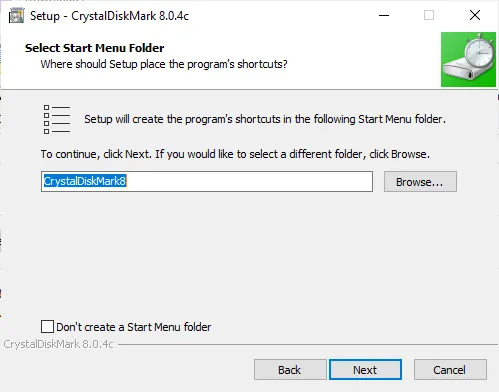
    • Follow Prompts: Follow the on-screen instructions to complete the installation. Choose the desired installation directory and agree to the terms and conditions.
    • Finish Installation: Once the installation process is complete, click’ Finish’. The software will be ready to use.
  2. Initial Configuration Settings
    • Launch CrystalDiskMark: Open the software from the Start menu or desktop shortcut.
    • Select Drive: Choose the drive you want to benchmark from the dropdown menu.
    • Set Test Parameters: Configure the number of test runs, test file size, and test mode (e.g., Sequential, Random).
    • Start Benchmark: Click the ‘All’ button to begin benchmarking.

By following these steps, you can easily install and set up CrystalDiskMark to start evaluating the performance of your storage devices.


System Requirements

OS Windows XP/Vista/7/8/8.1/10/11
Windows Server 2003/2008/2012/2016/2019/2022
Architecture x86/x64/ARM64
  • Installer and x64 version does not support Windows XP/2003 (NT5.x).
  • Not support Windows 95/98/Me/NT4/2000.


Advanced Features

  1. Command-Line Options
    • CrystalDiskMark provides command-line options for advanced users who prefer automation or integration with scripts and batch files.
    • Users can execute tests, specify parameters, and retrieve results via command-line commands, enhancing flexibility and scalability.
  2. Script Automation
    • Advanced users can automate benchmarking tasks using scripts.
    • CrystalDiskMark’s script automation capabilities enable the execution of predefined test scenarios, streamlining repetitive testing processes and saving time.
  3. Integration with Other Tools
    • CrystalDiskMark seamlessly integrates with other diagnostic and monitoring tools, enhancing its utility in comprehensive system analysis.
    • Integration with third-party applications enables users to correlate disk performance data with other system metrics, facilitating deeper insights and troubleshooting.
  4. Custom Test Profiles
    • CrystalDiskMark allows users to create custom test profiles tailored to specific use cases or testing scenarios.
    • Users can conduct specialized benchmarking tests to meet their unique requirements by defining custom test parameters and configurations.
  5. Multi-Language Support
    • CrystalDiskMark supports multiple languages, catering to a diverse user base worldwide.
    • Users can select their preferred language from the settings menu, ensuring a localized experience and improved accessibility.

By leveraging these advanced features, users can extend CrystalDiskMark’s functionality and optimize their storage performance with greater efficiency and precision.


Conclusion

CrystalDiskMark stands as an indispensable tool for users seeking to assess and enhance the performance of their storage devices. With its user-friendly interface, customizable test parameters, and comprehensive benchmarking capabilities, CrystalDiskMark empowers both novice and advanced users to accurately measure disk read and write speeds. By interpreting benchmark results, users can identify areas for improvement and optimize their storage solutions for enhanced efficiency and reliability.



What is CrystalDiskMark used for?

CrystalDiskMark is a benchmarking tool used to measure the performance of hard drives, solid-state drives (SSDs), and other storage devices.


Is CrystalDiskMark free to use?

Yes, CrystalDiskMark is free to download and use.


How do I download CrystalDiskMark?

You can download CrystalDiskMark from the official website or reputable software download platforms.


Is CrystalDiskMark compatible with macOS?

No, CrystalDiskMark is only compatible with Windows operating systems.


Can CrystalDiskMark benchmark external drives?

Yes, CrystalDiskMark can benchmark external drives connected via USB or other interfaces.


What are the system requirements for CrystalDiskMark?

CrystalDiskMark typically requires minimal system resources, including a 1 GHz processor, 1 GB RAM, and 50 MB of free disk space.


Does CrystalDiskMark support NVMe SSDs?

Yes, CrystalDiskMark supports NVMe SSDs, as well as SATA and other drive interfaces.


How do I interpret CrystalDiskMark benchmark results?

Benchmark results from CrystalDiskMark include read and write speeds in megabytes per second (MB/s) for sequential and random operations.


Can CrystalDiskMark be used to test RAID arrays?

Yes, CrystalDiskMark can benchmark RAID arrays, providing insights into their performance.


What is the difference between sequential and random tests in CrystalDiskMark?

Sequential tests measure data transfer speeds for large, contiguous files, while random tests simulate real-world usage patterns with small, random access operations.


How long does a CrystalDiskMark test take to complete?

The duration of a CrystalDiskMark test depends on the selected test parameters and the speed of the tested storage device.


Can CrystalDiskMark measure disk latency?

Yes, CrystalDiskMark can measure disk latency as part of its benchmarking process.


What is the best CrystalDiskMark test mode for SSDs?

For SSDs, the “Random” test mode is often recommended to evaluate real-world performance.


Does CrystalDiskMark support command-line usage?

Yes, CrystalDiskMark supports command-line usage for automation and scripting purposes.


Can CrystalDiskMark detect disk errors?

CrystalDiskMark focuses on benchmarking disk performance and does not diagnose or repair disk errors.


What is the difference between CrystalDiskMark and CrystalDiskInfo?

CrystalDiskMark measures disk performance, while CrystalDiskInfo provides disk health and status information.


Can CrystalDiskMark measure USB drive speeds?

Yes, CrystalDiskMark can benchmark USB drives and other external storage devices.


How accurate are CrystalDiskMark benchmark results?

CrystalDiskMark provides accurate benchmark results when configured correctly and used under appropriate conditions.


Does CrystalDiskMark support benchmarking multiple drives simultaneously?

Yes, CrystalDiskMark can benchmark multiple drives simultaneously, allowing for comparison between different devices.


Can CrystalDiskMark be used to compare different drive models?

Yes, CrystalDiskMark can be used to compare the performance of different drive models and configurations.


How often should I run CrystalDiskMark tests?

The frequency of running CrystalDiskMark tests depends on individual needs and preferences.


Can CrystalDiskMark help improve gaming performance?

CrystalDiskMark can help identify storage bottlenecks that may affect gaming performance.


What is the recommended test file size in CrystalDiskMark?

The recommended test file size in CrystalDiskMark depends on the specific testing requirements and goals.


Can CrystalDiskMark detect bad sectors on a disk?

CrystalDiskMark focuses on benchmarking performance and does not specifically detect bad sectors on a disk.


Is CrystalDiskMark available in languages other than English?

Yes, CrystalDiskMark supports multiple languages for user interface localization.

[rank_math_rich_snippet]